Voice Targets and Channels
A voice target tells Okareo who to call and how. Everything else in a simulation (drivers, scenarios, checks, augmentation) is identical across channels, so you pick the channel that matches how your real callers reach the agent and change nothing else.
| Channel | Reaches | Audio path | Use when |
|---|---|---|---|
| Phone | A phone number (PSTN) | Telephony, 8 kHz | Your agent answers a phone number |
| SIP | A sip: URI | Telephony; 8 kHz by default, wideband where the endpoint supports it | Your agent sits behind a SIP trunk or SIP-capable platform (LiveKit, Vapi, Telnyx, Daily, ...) |
| WebRTC | A WebRTC session (LiveKit, Retell, Daily, SmallWebRTC/Pipecat) | Native, 24 kHz Opus | Your agent is web- or app-embedded and never touches a phone line |
| Realtime API | A speech-to-speech model endpoint (OpenAI Realtime, Deepgram) | Direct WebSocket | You want to test model-level behavior before any telephony exists |
Phone and SIP calls travel a real telephony path, so they exercise codec compression, carrier behavior, and everything else your production callers experience. WebRTC targets connect at full quality. Use them when your production channel is the web, or when you want to isolate agent behavior from telephony artifacts.
Phone
The simplest target: Okareo manages the telephony provider and dials your agent's number.
In the App
Go to Targets, click New Target, switch the type selector to Voice, and pick Phone. Enter the To Phone Number and click Create.
From the SDK
from okareo.model_under_test import PhoneTarget, Target

target = Target(
    name="My Voice Agent",
    target=PhoneTarget(phone_number="+1XXXXXXXXXX"),
)
If you prefer to dial from your own Twilio account (your caller ID, your billing), use TwilioVoiceTarget with your account_sid, auth_token, and from_phone_number instead.
SIP
Dial any voice agent reachable at a SIP URI (an agent fronted by LiveKit, Vapi, Daily, a Telnyx trunk, or your own SBC) without giving it a phone number.
In the App
In the voice target form, pick SIP and enter the SIP URI (e.g. sip:agent@your-domain.example.com), plus a SIP Username and SIP Password if the endpoint requires authentication.
From the SDK
from okareo.model_under_test import SipTarget, Target

target = Target(
    name="My SIP Agent",
    target=SipTarget(
        sip_uri="sip:+15551234567@sip.telnyx.com",
        sip_username="my-trunk-user",   # optional digest auth
        sip_password="my-trunk-secret",
    ),
)
Authentication uses SIP digest credentials passed separately from the URI, so it works with carriers where the auth username differs from the dialed address. The password is stored as a sensitive field and redacted from logs.
Every outbound SIP dial carries an X-Okareo-Context-Token header identifying the conversation. If your agent's platform passes SIP headers through (e.g. LiveKit inbound trunks with include_headers enabled), your agent can stamp its own telemetry with that token and its traces will land on the simulation conversation automatically. See Linking Traces to Simulations.
WebRTC
Test web-first voice agents over their native transport at full audio quality: no phone number, no SIP trunk, no telephony compression. These are not generic WebRTC handshakes: each platform gets a native integration, so Okareo joins your agent's session exactly the way a real user's client would.
LiveKit
You provide your LiveKit URL, API key, API secret, and a room name. Okareo mints its own roomJoin access token from those credentials and joins the room directly as a participant: no token endpoint to build, no SIP trunk to configure.
LiveKit is the platform with the full lifecycle: simulate over WebRTC (this section) or SIP, then observe production with LiveKit voice monitoring. Egress recordings and per-turn OTel traces correlate by room name, and recordings of simulated calls land on the simulation conversation automatically. One integration covers test and monitor.
Retell
You provide your Retell agent ID (plus a Retell API key, on the target or at run time). Okareo calls Retell's create-web-call API and joins the resulting call the same way Retell's own web widget does. The simulation exercises the true end-user path, your agent exactly as Retell configures and runs it, and Retell's vendor call events are captured into the conversation metadata. Retell is also a supported voice monitoring provider, so the same agent can be observed in production.
Daily
You provide the room URL, plus a meeting token for private rooms. Okareo joins the room directly as a participant.
SmallWebRTC (Pipecat)
For agents using Pipecat's SmallWebRTC transport (or anything speaking the same offer/answer pattern): you provide the SDP offer URL, with optional auth headers, request data, and STUN/TURN servers. Okareo posts an offer and connects peer-to-peer, useful for self-hosted agents with no platform in front of them.
In the App
In the voice target form, pick your WebRTC provider (LiveKit, Retell, Daily, or SmallWebRTC) and fill in the platform fields above. The Test Calls section lets you place a live test call from the browser before you run a full simulation: you hear the agent, watch the connection state, and see connection errors surfaced directly.
From the SDK
Create the WebRTC target in the app once, then reference it by name:
result = okareo.run_simulation(
    name="WebRTC Voice Sim",
    target="My LiveKit Agent",   # target created in the app
    scenario=scenario,
    driver=driver,
    max_turns=5,
    checks=["time_to_first_audio", "result_completed"],
)
Recordings use the platform's native recording when available and fall back to a locally mixed dual-channel recording, so you get playable call audio without granting egress permissions.
Dialing Extensions and Navigating IVRs
Real agents often live behind a menu: "press 2 for claims", an extension, a conference PIN. Okareo gets through in two ways, and they solve different problems.
The Driver navigates the IVR itself
The Driver can press keypad tones mid-call, choosing what to press from what it hears and what its prompt tells it. Give it the routing intent in its prompt or the scenario row ("you are calling about a claim; when the menu offers claims, press 2; if asked for an account number, key in 4417") and it listens to the menu and dials at the right moment, the way a real caller would.
Because the Driver decides from call context, this handles what static digits cannot: menus that change, prompts that arrive mid-conversation ("enter your account number now"), and multi-step IVR trees. It also makes the IVR itself testable behavior: a wrong turn in the tree shows up in the transcript and fails the run's checks like any other agent mistake.
Fixed digits at call start
For a known, deterministic path (an extension, a conference PIN), set the Extension field on a Phone or Twilio target. Digits 0-9, *, #, and w (a half-second pause) are supported, e.g. ww2ww1204 waits, presses 2, waits, then dials extension 1204. These digits are sent once, right after the call is answered.
The digit string supports scenario templating, so different rows can navigate to different departments in the same run:
# scenario rows steer the IVR per conversation
{"input": {"goal": "File a claim", "digits": "2"}, "result": "Claims agent answers"}
{"input": {"goal": "Check a policy", "digits": "3"}, "result": "Policy agent answers"}
with the target's extension set to {scenario_input.digits}.
Call Timeouts
On Phone, SIP, and WebRTC calls, two run settings decide how long a call waits on the agent. The Realtime API channel does not use them. In the App they are in the simulation form under Advanced Settings → Voice Simulation Settings; in the SDK they are run_simulation arguments.
| Setting | Parameter | Range | Default |
|---|---|---|---|
| Target Reply Timeout | silence_timeout_ms | 500–30,000 ms | 10,000 ms |
| Hold Timeout | hold_timeout_ms | 10,000–600,000 ms | Off |
Target Reply Timeout is how long the caller waits for the agent to start making any sound after speaking. When it elapses, the turn is recorded as unanswered and the caller speaks again; after three unanswered turns in a row, Okareo hangs up and the transcript ends with "No response from the Target" and Call ended by Okareo.
Hold Timeout hangs up if the agent produces no recognizable speech for this long — hold music, ringing, an IVR queue, dead air — at any point in the call. The clock starts once your caller's line has finished playing and restarts whenever the agent, or a human who picks up, says something recognizable; hold music, ringback and dead air do not restart it. When it elapses, the transcript ends with "Hold timeout: no speech from the Target for 30s", where 30 is the limit you set in seconds, and Call ended by Okareo; the run's Simulation Params show the limit that applied. Use it to bound an escalation to a human: the caller stays on the line while the transfer rings, and the call closes on its own if nobody joins.
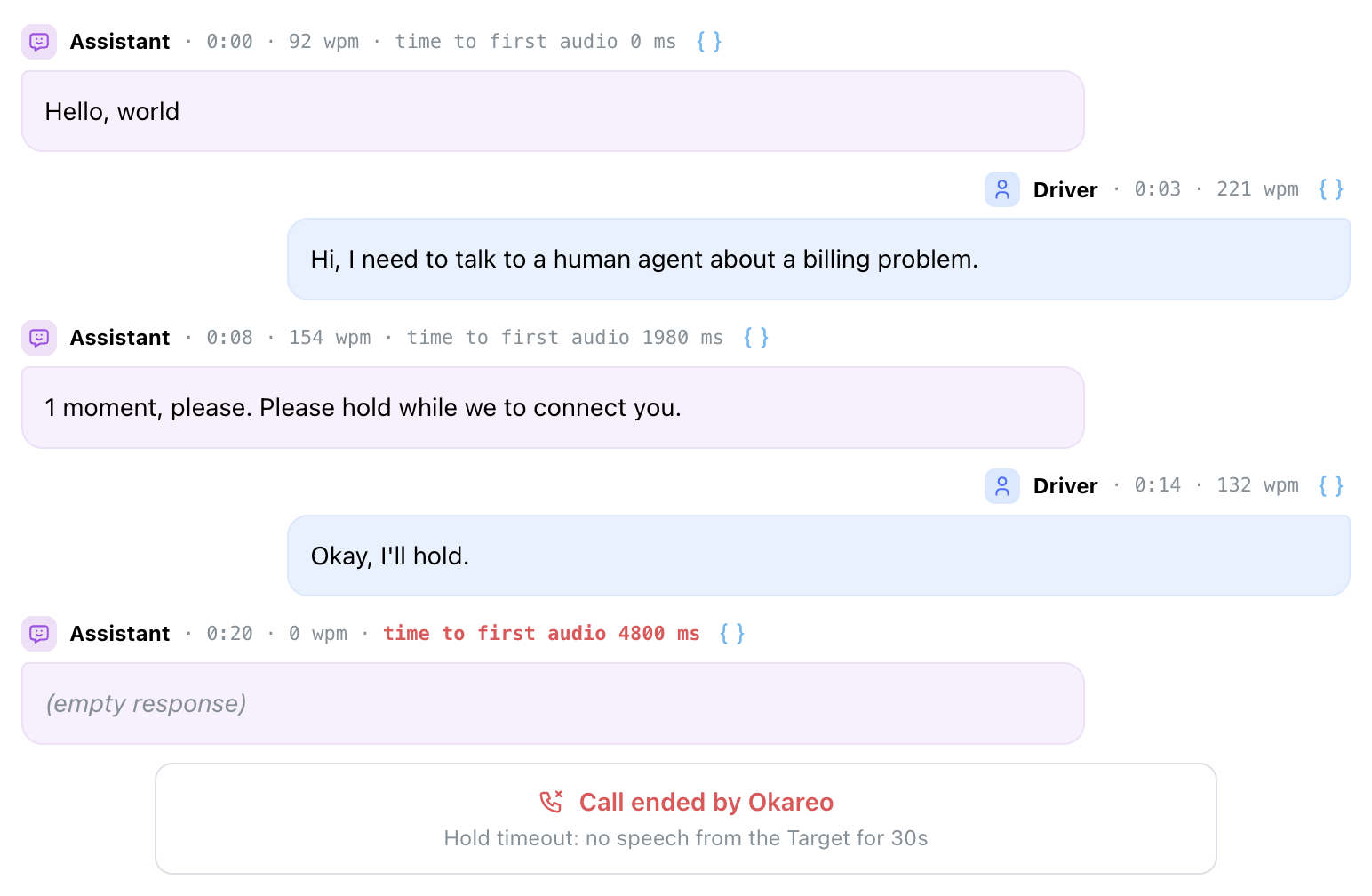
result = okareo.run_simulation(
    name="Escalation to a human",
    target=target,
    scenario=scenario,
    driver=driver,
    max_turns=8,
    hold_timeout_ms=30000,  # hang up after 30 seconds without the agent speaking
)
Concurrency
All voice targets accept Max Parallel Requests, which caps how many simultaneous calls hit your agent. Leave it unset for the platform default. This is the primary knob for load testing.
Verification Codes and Other Messages
Every voice target can receive messages the agent sends the caller through a second channel: a one-time passcode by text, an email, an app notification. Switch on Inbox on the target and your system posts the message while the call is live; the caller reads it on its next turn. See Verification Codes (OTP) and Notifications.
Where to Go Next
- Your First Voice Simulation: run a scored call end to end.
- Load Testing: drive concurrent calls through any of these channels.
- Voice Monitoring: observe the same agents in production, including LiveKit recording ingestion.