Voice Simulation
Why Voice Simulations Matter
Voice simulations are synthetic, controllable reproductions of real customer calls. They have become a critical capability for any organization deploying AI voice agents. Three converging trends explain why.
1. Voice agents are shipping faster than teams can manually QA them
Audio-native models have moved from 30% task-completion to 67% in eight months. That pace means new model versions, prompt changes, and integration updates ship constantly. Manual testing cannot keep up. Voice simulation provides repeatable, automated coverage that runs on every change.
2. Text-passing does not guarantee voice-passing
An agent that solves a task flawlessly over text may fail the same task over voice. The gap comes from:
- ASR errors compounding across turns. Accents, background noise, and telephony compression introduce transcription drift that accumulates as the conversation progresses.
- Turn-taking failures. Interruptions, backchannels, and overlapping speech confuse tool-calling sequences and break the agent's conversation logic.
- Integration fragility. A misheard account number causes an API call to fail, and the agent never recovers.
These are integrated failures that only surface when task execution and conversational dynamics are tested together, under realistic audio conditions. Benchmarking text and audio separately misses them entirely.
3. Customer experience assurance demands proactive, not reactive, quality
Enterprises can no longer afford to let customers be the ones who "test" their systems. Voice simulation enables organizations to identify failures before they reach production, across AI agents, backend integrations, and handoffs to human agents.
What Okareo Does
Okareo orchestrates real conversations against your voice agent over phone, WebRTC, SIP, or any voice channel, and evaluates what happened. The underlying transport is a configuration detail. Your testing practice is the same regardless of channel.
Voice Simulation runs the same engine as Multi-Turn Simulation, extended for live voice channels. If you already run text-based simulations, voice works the same way. Point at a voice target instead of a chat endpoint.
How a Simulation Works
Every voice simulation follows a five-step lifecycle:
-
Compose the building blocks. You define a Target (your voice agent), a Driver (a simulated caller persona), a Scenario (one or more test rows with inputs and expected outcomes), and Checks (the metrics that score the conversation).
-
Start a Simulation. Okareo pairs one Target, one Driver, and one Scenario row. It initiates the call, applies the scenario parameters to the driver prompt, and begins the conversation with the configured first speaker.
-
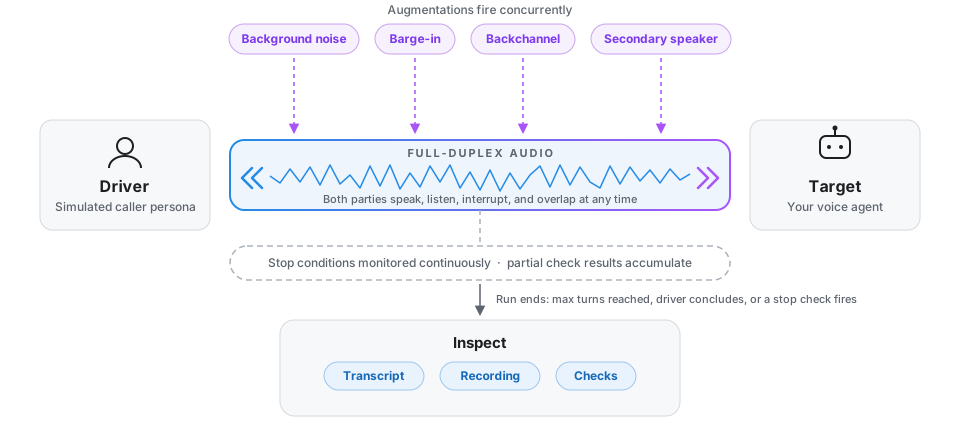
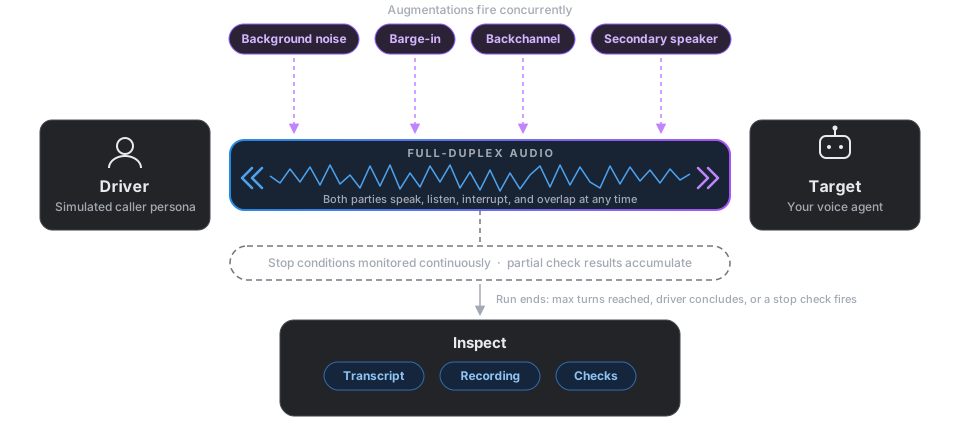
Real-time conversation. Once the call connects, both parties communicate simultaneously over a full-duplex audio channel. The Driver and Target can speak, interrupt, overlap, and respond naturally, just like a real phone call. Augmentations (background noise, barge-in, backchannel, secondary speakers) fire concurrently according to their configured probabilities. Stop conditions are monitored continuously and partial check results accumulate throughout the conversation.
-
Stop and finalize. The run ends when the max turn count is reached, the Driver concludes, or a designated stop check returns true. Checks are computed a final time and aggregated across the conversation.
-
Inspect. You get the full transcript, per-turn check annotations, final scores, the merged WAV recording, and (for voice targets) the raw audio per turn. Everything is available in the Okareo app and via the SDK.
Use Cases
A. AI Agent Validation
Does your agent complete tasks, stay on policy, ground answers in your knowledge base, and resist jailbreaks? Simulate diverse caller personas across accents, speaking styles, and emotional states. Measure task completion, compliance, accuracy, guardrails, and bias.
AI Agent & Integration Testing →
B. Regression Testing Under Realistic Conditions
Run the same test suite before and after a model change, under background noise, barge-in, and accent diversity. Controllable audio augmentation is how you catch regressions that clean-audio tests miss.
Voice Augmentation → | Experimentation and A/B Testing →
C. Load Testing
What breaks when 50 calls land simultaneously? Latency cliffs, queue saturation, and routing failures. Load testing stress-tests the entire stack: network, routing engine, AI agent, CRM integrations, and agent desktop.
D. Network and Voice Quality Monitoring
Simulated calls placed under specific conditions detect carrier-level degradation, codec issues, and routing failures that only manifest on certain paths.
E. AI-to-Human Handoff Testing
The highest-stakes decision a voice agent makes. Does escalation fire when it should, and only then? Premature escalation wastes agent minutes; missed escalation burns customer trust.
F. Continuous Production Monitoring
Beyond one-time test passes, scheduled simulations catch drift, carrier outages, and integration regressions in production over time.
What's in This Section
Everything below is available through both the Okareo app and the SDK. Start in whichever fits your workflow.
| Page | What you learn |
|---|---|
| Your First Voice Simulation | Run a live scored call in two minutes |
| Voice Targets and Channels | Phone, SIP, and WebRTC (LiveKit, Retell, Daily, SmallWebRTC) targets; IVR navigation with DTMF |
| Personas and Scenarios | Custom callers with voice identity and tone, multi-row scenarios, recordings |
| Voice Checks | Code, LLM, and audio checks; latency percentiles |
| Re-Scoring Past Runs | Apply new checks to an existing run without placing new calls |
| Voice Augmentation | Background noise, barge-in, backchannel, dropout, and other realistic conditions |
| Experimentation and A/B Testing | Statistical comparison of two agent configurations with Bayesian and frequentist testing |
| CI Gating | Threshold-based quality gates for CI pipelines |
| Load Testing | Concurrent calls, p50/p90 latency under volume |
| AI Agent & Integration Testing | What to test: task completion, compliance, accuracy, guardrails, bias, backend integration |
| AI-to-Human Handoff Testing | Validating escalation decisions in both directions |
Each page links to a companion script from the voice simulation cookbook where applicable.
Prerequisites
- An Okareo account (sign up)
- A voice target: a phone number for your agent, a WebRTC endpoint, or a SIP URI (see Voice Targets and Channels)
For SDK usage, also set OKAREO_API_KEY as an environment variable and install the Python package (pip install okareo).
Okareo handles the call orchestration, simulated callers, recordings, and quality scoring.
Cross-References
- Multi-Turn Simulation: shared concepts (Target, Driver, Scenario, Check) and chat / prompt / custom-endpoint patterns.
- Creating Drivers: driver prompting theory (helper bias, drift, hard rules, turn-end checklist).
- Scheduling Simulations: run voice simulations on cron, in CI, or on push.
- Voice Monitoring: production observability for the same voice agents you tested here.
- Linking Traces to Simulations: simulated calls correlate with your agent's OTel traces and recordings via the Context Token, including over SIP headers and LiveKit rooms.
Full runnable scripts: tutorials/voice-simulation/