Deploy Okareo Standalone on Kubernetes
This guide deploys Okareo standalone with Helm on any conformant Kubernetes cluster.
It is cloud-provider agnostic and uses a companion repository:
okareo-helmon GitHub
All commands below assume you cloned and run from that directory.
Capacity planning
Before deploying, choose a sizing profile for your cluster.
Use these profiles as a starting point for control plane + Okareo workloads in the cluster:
| Profile | Recommended cluster capacity | Typical use |
|---|---|---|
| Small (S) | 8 vCPU, 32 GiB RAM | Non-production environments and light internal usage. |
| Medium (M) | 16 vCPU, 64 GiB RAM | Production baseline for most teams. |
| Large (L) | 32 vCPU, 128 GiB RAM | Higher concurrency and heavier evaluation workloads. |
Minimum scheduling baseline: ensure at least 6 vCPU and 28 GiB RAM are available for default chart resource requests before adding buffer for autoscaling, node/system overhead, and your own traffic patterns.
If you use external dependencies (for example external Redis HA (Redis-compatible) and NATS), account for their capacity separately.
Companion repository layout
Expected files in the okareo-helm repository:
helm/okareo-standalone/helm/okareo-redis-ha/examples/okareo-values.example.yamlexamples/okareo-app-secrets.example.yamlexamples/nginx-ingress.example.yamlexamples/overlay-single-cluster.yamlexamples/overlay-services-external.yamlexamples/overlay-services-only.yamlexamples/overlay-frontend-only.yamlexamples/redis-ha-4node.servicepool.example.yamlexamples/nats-4node.servicepool.example.yaml
What this chart deploys
The okareo-standalone chart supports component toggles:
frontendservicesredisnatsdb(optional PostgreSQL fallback)
Naming note:
- In-chart cache/broker settings use
redisnaming (redis.*values keys). - External HA cache dependency in this guide is
okareo-redis-ha(Redis + Sentinel).
Architecture overview
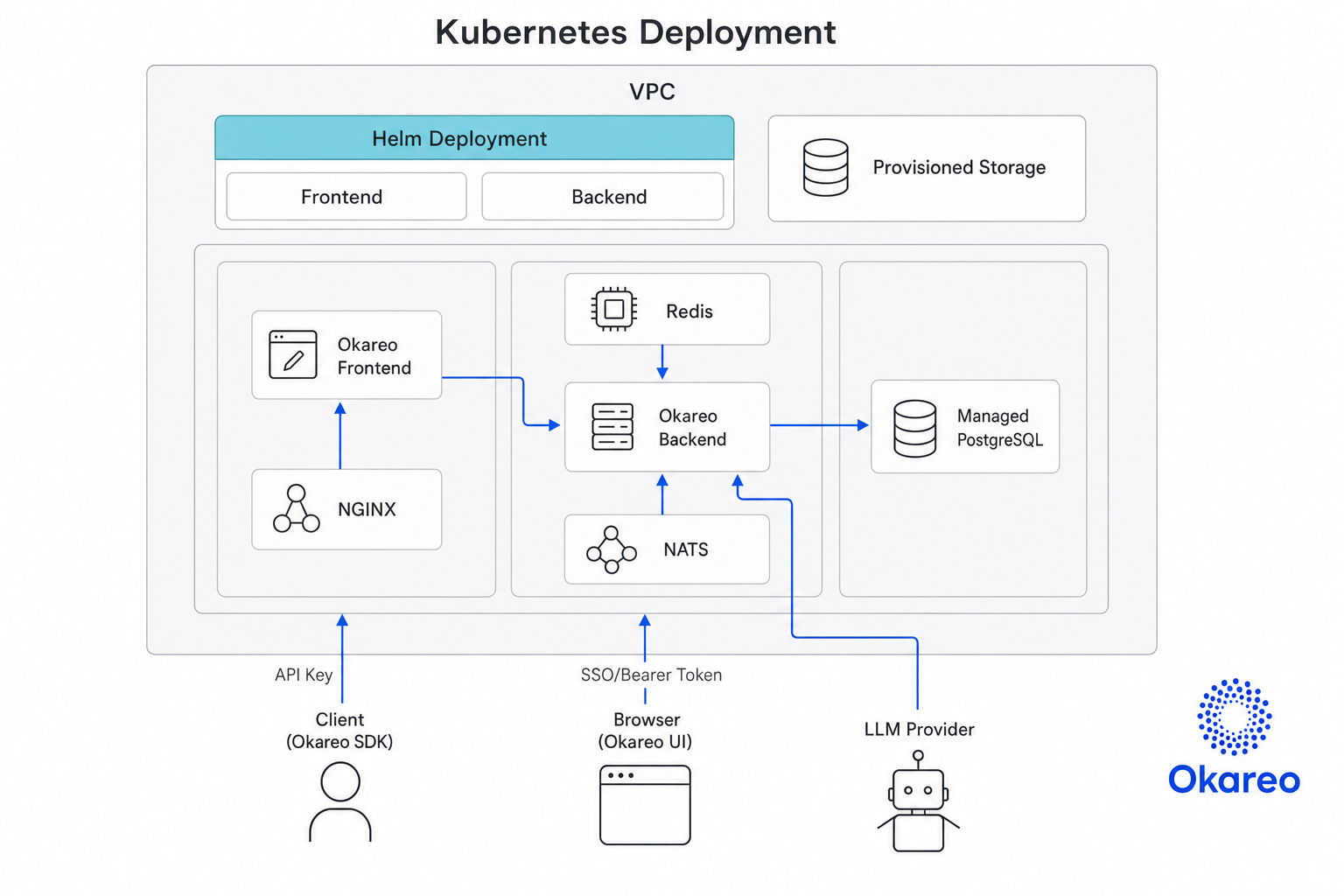
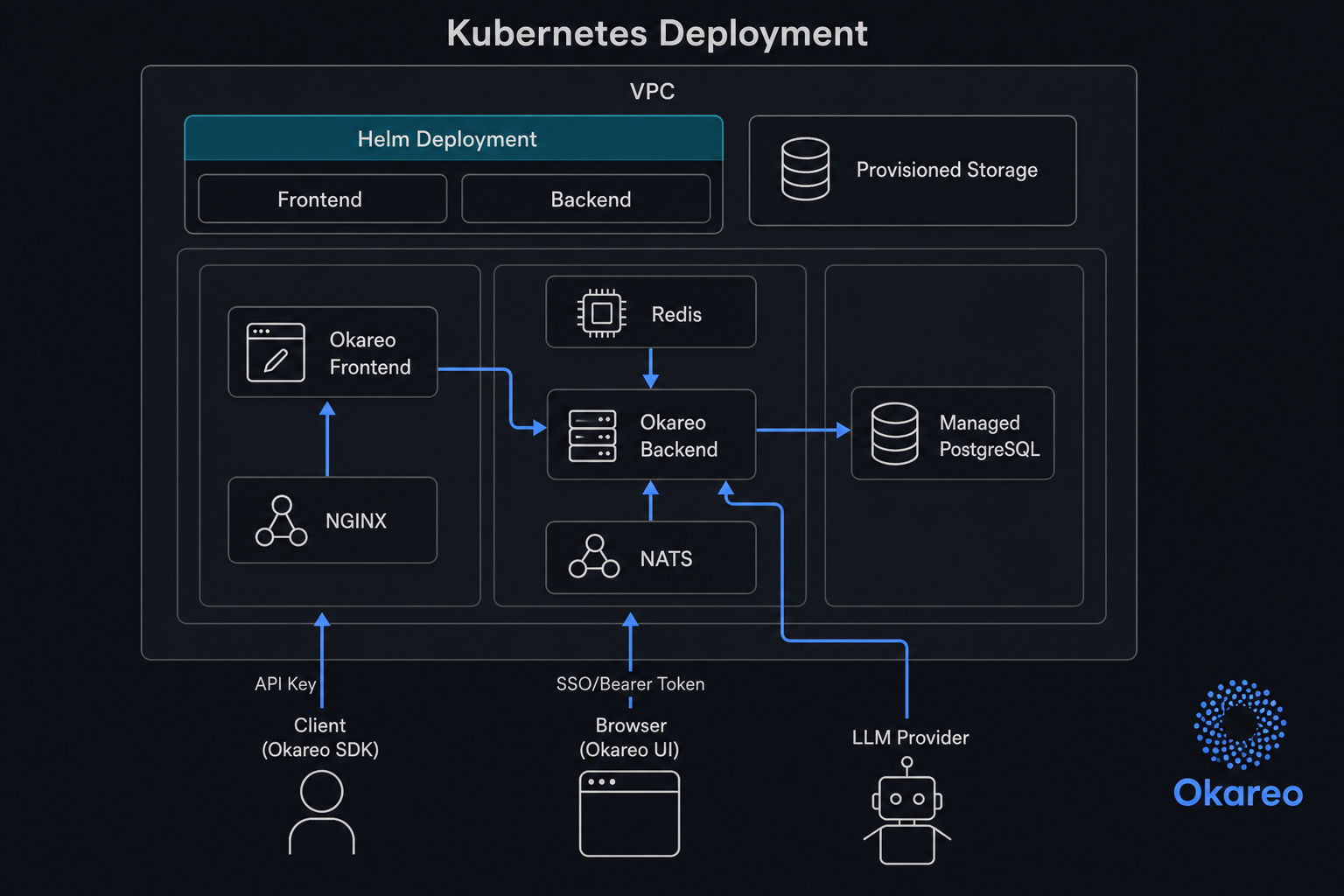
The standalone Kubernetes deployment places frontend and backend components behind ingress, with Redis/NATS used by services and PostgreSQL as the system database. The Helm charts support an frontend/backend topology that separates internet-facing ingress and frontend from backend/data components, or a single-release deployment that runs all required components together in one Kubernetes release.
The split topology is shown below for illustrative purposes.
Deployment modes
-
Single-cluster (single release, ingress-first default)
- One Helm release with frontend + services.
- Frontend/services stay internal (
ClusterIP) and are exposed via ingress. - Includes services ingress upstream timeout annotations (
proxy-connect/send/read-timeout). - Overlay:
examples/nginx-ingress.example.yaml
-
Single cluster, external data plane
- One app release (services/frontend as needed) with external Redis HA (Redis-compatible) + NATS.
- Overlay:
examples/overlay-services-external.yaml
-
Split releases (recommended for production boundaries)
okareo-servicesrelease with services only.okareo-frontendrelease with frontend only.- Recommended trust split:
- frontend frontend via ingress/TLS
- backend services via direct LoadBalancer exposure
- backend Redis HA + NATS as separate releases
- Overlays:
examples/overlay-services-only.yaml,examples/overlay-frontend-only.yaml
Prerequisites
- Kubernetes cluster + working
kubectlcontext. - Helm 3.x.
okareo-helmrepository cloned locally.- Access to Okareo image registry.
- Tenant configuration bundle from Okareo.
- Runtime secrets and model configuration values.
- Ingress controller installed (for example,
ingress-nginx) for frontend/API exposure.
Tenant configuration bundle means the environment-specific tenant identity and auth/bootstrap settings provided by Okareo for your standalone deployment. Apply this bundle in your deployment values during step 4 (tenant-related settings) and in application secrets during step 3 when required.
Enterprise operator note
The examples in this guide do not configure per-component securityContext or
serviceAccount overrides. If your chart version does not expose these values,
apply your baseline controls at the cluster/namespace layer (for example Pod
Security Admission, policy enforcement, network policies, and workload identity
bindings), or use environment-specific overlays.
For chart capability updates, track the okareo-helm repository and release
notes: okareo-helm.
1) Prepare namespace and chart
git clone https://github.com/okareo-ai/okareo-helm
cd okareo-helm
export NS="okareo"

kubectl create namespace "$NS" --dry-run=client -o yaml | kubectl apply -f -
helm lint ./helm/okareo-standalone
2) Ensure ingress controller
This guide uses ingress-nginx in examples because it is widely available
across managed and self-managed clusters and supports the timeout annotations
used by the provided ingress overlay.
You can use other ingress controllers (for example AWS Load Balancer Controller, Traefik, or Istio ingress) if you adapt ingress class names and annotations in your values/overlay files.
If your cluster does not already have an ingress controller, install one.
Example (ingress-nginx):
helm repo add ingress-nginx https://kubernetes.github.io/ingress-nginx
helm repo update
helm upgrade --install ingress-nginx ingress-nginx/ingress-nginx \
  -n ingress-nginx --create-namespace
3) Create application secret
Start from the provided template and fill placeholders:
kubectl -n "$NS" apply -f examples/okareo-app-secrets.example.yaml
Required keys (all deployments):
DB_USER,DB_PASSWORD,DB_NAME,DATABASE_URL,TENANT_DBEVAL_API_KEY,VLLM_API_KEY
If you enable SSO mode, also add:
SSO_CLIENT_SECRET
Additional keys are required for Okareo licensing. These will be provided by Okareo as part of your deployment bundle.
For SSO configuration details, see Okareo Standalone SSO.
4) Create runtime values file
Copy and edit:
cp examples/okareo-values.example.yaml okareo-values.yaml
Set tenant values, model values, and any endpoint overrides needed for your environment.
For ingress-first deployments, set public endpoints that match your ingress hostnames.
This guide uses api.example.com and app.example.com consistently as example
hosts:
config:
  okareoApiGateway: "http://api.example.com"
  okareoAppDomain: "http://app.example.com"
Use host-based routing (api.example.com and app.example.com) for production. Path-based routing can be used for temporary IP-only testing, but host-based routing is strongly recommended.
Optional: enable OIDC SSO
To enable SSO, set auth mode to sso for both services and frontend in okareo-values.yaml:
services:
  extraEnv:
    - name: OKAREO_STANDALONE_AUTH_MODE
      value: sso
    - name: SSO_ISSUER_URL
      value: https://<OIDC_ISSUER_URL>
    - name: SSO_CLIENT_ID
      value: <OIDC_CLIENT_ID>
    - name: SSO_SCOPES
      value: openid email profile
    - name: SSO_SESSION_MAX_SEC
      value: "172800"

frontend:
  extraEnv:
    - name: OKAREO_STANDALONE_AUTH_MODE
      value: sso
Optional policy gates:
SSO_ALLOWED_CLAIMSSO_ALLOWED_VALUES(comma-separated)
Secret placement for SSO_CLIENT_SECRET:
- If using
secretKeyRefruntime mode (default), addSSO_CLIENT_SECRETtookareo-app-secrets. - If using
envFileruntime mode, addSSO_CLIENT_SECRETto the mounted env file consumed by services.
For provider-specific OIDC setup and claim allowlist behavior, see Okareo Standalone SSO.
5) Install dependencies (external Redis HA + NATS)
Recommended for production/split modes:
helm upgrade --install okareo-redis-ha ./helm/okareo-redis-ha \
  -n "$NS" --create-namespace \
  -f examples/redis-ha-4node.servicepool.example.yaml

helm repo add nats https://nats-io.github.io/k8s/helm/charts/
helm repo update
helm upgrade --install okareo-nats nats/nats \
  -n "$NS" --create-namespace \
  -f examples/nats-4node.servicepool.example.yaml
NATS network exposure and hardening
Prefer internal-only NATS connectivity for production. NATS should typically be reachable only by Okareo services inside the cluster.
Exception for trust-split topology: if frontend and services run across cluster
boundaries, expose NATS as LoadBalancer using controlled network policy
(CIDR allowlists/firewall rules) so frontend-side clients can reach backend
NATS safely.
- Verify the NATS service is not unintentionally internet-exposed.
- Prefer
ClusterIPfor NATS service type whenever possible. - If you must use
LoadBalancer, restrict inbound CIDRs withloadBalancerSourceRangesand apply your cloud firewall controls.
Example values (key names vary by chart/version; commonly service.type and
service.loadBalancerSourceRanges):
service:
  type: ClusterIP
If external access is required:
service:
  type: LoadBalancer
  loadBalancerSourceRanges:
    - 10.0.0.0/8
    - 192.168.0.0/16
6) Deploy Okareo
Option A: single release (all in one)
helm upgrade --install okareo ./helm/okareo-standalone \
  -n "$NS" --create-namespace \
  -f okareo-values.yaml \
  -f examples/nginx-ingress.example.yaml \
  --wait --timeout 20m
Custom endpoint TLS verification is enabled by default and should remain enabled for production with CA-signed certificates.
Option B: split releases (recommended)
For trust-split deployments:
- deploy backend services release with direct LB (
overlay-services-only) - deploy frontend frontend release with ingress/TLS intent (
overlay-frontend-only)
Deploy services release (split, direct LB):
helm upgrade --install okareo-services ./helm/okareo-standalone \
  -n "$NS" --create-namespace \
  -f okareo-values.yaml \
  -f examples/overlay-services-only.yaml \
  --wait --timeout 20m
Deploy frontend release (split, ingress):
helm upgrade --install okareo-frontend ./helm/okareo-standalone \
  -n "$NS" --create-namespace \
  -f okareo-values.yaml \
  -f examples/overlay-frontend-only.yaml \
  --set-string "config.okareoApiGateway=http://api.example.com" \
  --wait --timeout 20m
Optional post-deploy hardening: HTTPS / TLS termination
To enable HTTPS with TLS termination at the ingress (including TLS secret creation), see Configure HTTPS / TLS Termination.
7) Validate deployment
7.1 Releases
helm -n "$NS" list
Expected:
- target release(s) show
STATUS: deployed
7.2 Workloads and services
kubectl -n "$NS" get pods -o wide
kubectl -n "$NS" get deploy
kubectl -n "$NS" get svc
Expected:
- pods
Running - deployments
AVAILABLEmatch desired replicas - no long-lived
Pending/CrashLoopBackOff/ImagePullBackOff
7.3 API and UI reachability
API health:
curl -sS -X POST "http://api.example.com/v0/health"
Frontend HTTP code:
curl -sS -o /dev/null -w "%{http_code}\n" "http://app.example.com/"
Expected:
- API health returns success payload
- frontend returns
200or302
8) Upgrade workflow
- Update
okareo-values.yamland/or image tags. - Re-run
helm upgrade --install ... --wait --timeout ...for target release(s). - Re-run validation checks.
Troubleshooting
-
Pending pods due to scheduling
kubectl -n "$NS" describe pod <pod>- common causes: strict anti-affinity, nodeSelector/toleration mismatch, insufficient nodes.
-
Services cannot connect to Redis/NATS
- verify
redis.external.host(Redis endpoint) andnats.server.urlin values.
- verify
-
NATS is exposed more broadly than intended
- check service type and external IP:
kubectl -n "$NS" get svc | grep nats - prefer
ClusterIPfor internal-only traffic. - if
LoadBalanceris required, restrict client CIDRs vialoadBalancerSourceRanges.
- check service type and external IP:
-
Ingress routes frontend and API to wrong backend
- ensure frontend and services do not both claim
path: /on the same host. - use host-based routing in production to avoid path collisions.
- ensure frontend and services do not both claim
-
Intermittent
504 Gateway Time-outduring heavy test runs- verify services ingress timeout annotations are present and sufficiently high.
- check ingress live annotations:
kubectl -n "$NS" get ingress okareo-services-okareo-standalone-services -o jsonpath='{.metadata.annotations.nginx\.ingress\.kubernetes\.io/proxy-connect-timeout}{"\n"}{.metadata.annotations.nginx\.ingress\.kubernetes\.io/proxy-send-timeout}{"\n"}{.metadata.annotations.nginx\.ingress\.kubernetes\.io/proxy-read-timeout}{"\n"}'
-
TLS or SSO callback errors
- verify
config.okareoApiGatewayandconfig.okareoAppDomainuse valid publichttps://URLs. - verify ingress
hostsand TLS secret hostnames match callback domains.
- verify
-
Template validation errors
- chart enforces required combinations (for example services enabled with external deps).
-
Secret wiring failures
- verify required keys for your selected auth mode exist in
okareo-app-secrets.
- verify required keys for your selected auth mode exist in
-
SSO login fails or loops
- verify
OKAREO_STANDALONE_AUTH_MODE=ssois set in bothservices.extraEnvandfrontend.extraEnv. - verify
SSO_ISSUER_URL,SSO_CLIENT_ID, andSSO_CLIENT_SECRETare present and correct.
- verify
Next step: Configure HTTPS / TLS Termination
Related: Single Sign-On (SSO) | Model Configuration