Okareo Standalone
Okareo Standalone is a self-hosted deployment mode where Okareo runs entirely inside your environment using container images you control. It is designed for teams that need to evaluate and test LLM applications without relying on Okareo's cloud control plane.
What's included
| Component | Description | Exposure |
|---|---|---|
| Okareo Web UI (frontend) | Browser-based dashboard for setup, evaluation results, and project management | User-facing |
| Okareo Services API (backend) | REST API for orchestration, evaluation runs, and SDK/CLI calls | User-facing |
| PostgreSQL | Persistent metadata, evaluation results, and user data | Internal |
| Redis | Caching and job queueing | Internal |
| NATS | Internal event streaming and async job coordination | Internal |
| LLM Proxy (optional) | Telemetry gateway that captures LLM API calls without changing app code | Optional |
Architecture
The Web UI is a browser application that calls the Services API over the network from the user's browser. The Services API persists data in PostgreSQL, uses Redis for caching and job queues, and uses NATS for internal messaging. When you run evaluations, the Services API calls out to your configured model endpoints (Azure OpenAI, OpenAI, vLLM, etc.).
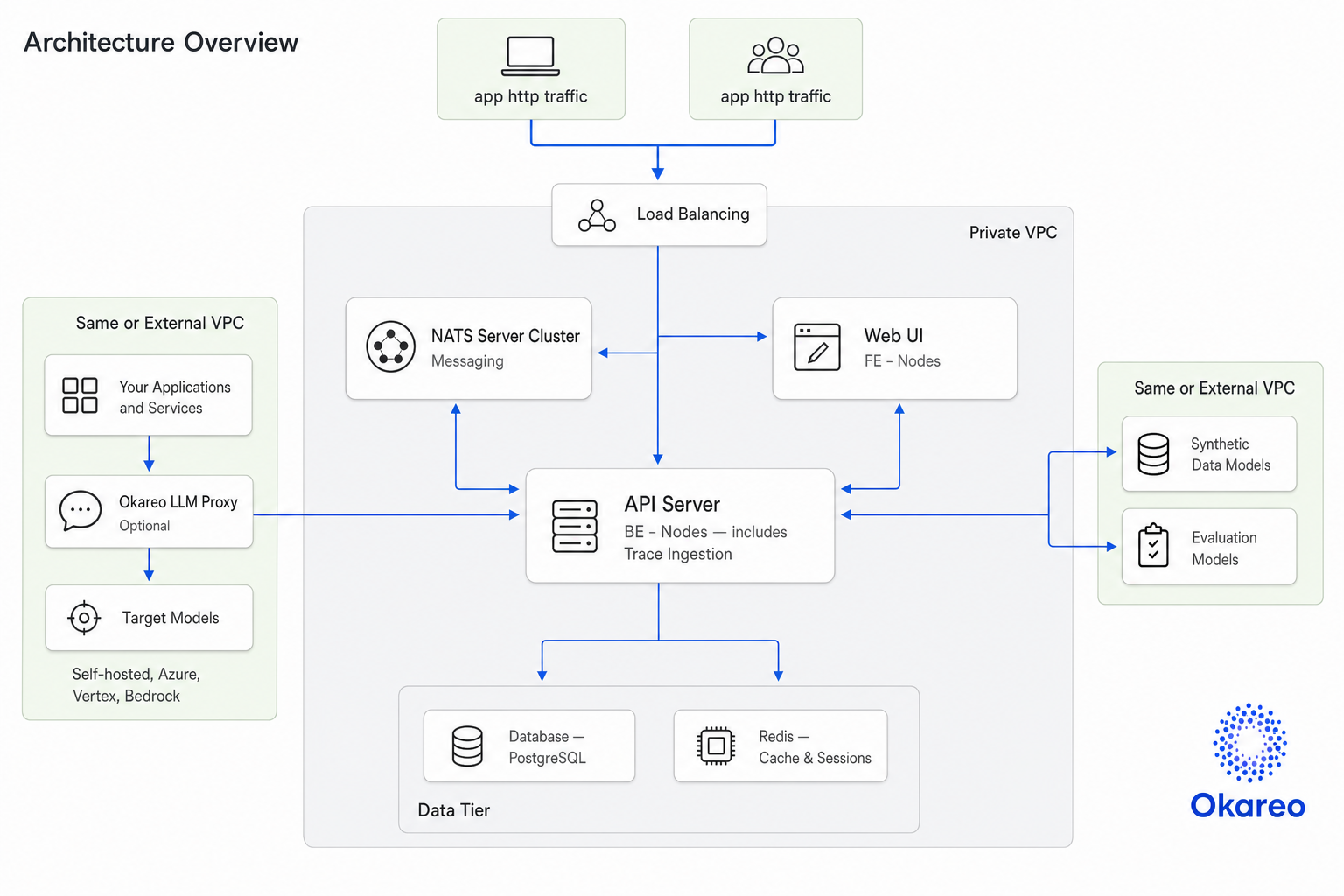
The UI calls the API from the user's browser, not from inside Docker. OKAREO_API_GATEWAY must be reachable from user machines, not just from the containers.
NATS
NATS provides lightweight messaging for internal coordination:
- Coordinating async and long-running evaluation jobs
- Pub/sub job status events
- Real-time status updates
You do not interact with NATS directly -- it is an internal dependency. To connect to an external NATS server, set AIRGAP_NATS_URL (defaults to nats://localhost:4222).
LLM Proxy (optional)
Some teams deploy an Okareo LLM Proxy to capture LLM telemetry without changing application code. The proxy receives LLM API calls, forwards them to the actual provider, and captures metadata for observability and evaluation.
Placeholder reference
Throughout the standalone documentation, these placeholders appear in configuration examples. Replace them with values specific to your environment.
| Placeholder | Description | Example |
|---|---|---|
<UI_HOST> | DNS name or IP where users reach the Okareo UI | okareo-ui.company.internal |
<API_HOST> | DNS name or IP where users reach the Okareo API | okareo-api.company.internal |
<OKAREO_UI_URL> | Full UI URL: http(s)://<UI_HOST>[:port] | https://okareo.company.internal |
<OKAREO_API_URL> | Full API URL: http(s)://<API_HOST>[:port] | https://okareo-api.company.internal |
<OKAREO_TENANT_ID> | Tenant identifier provided by Okareo | -- |
<OKAREO_AIRGAP_TOKEN> | JWT token provided by Okareo (one per tenant) | -- |
<EVAL_API_KEY> | Provider API key (Azure, OpenAI, etc.) | -- |
<VLLM_API_KEY> | vLLM API key if using vLLM | -- |
In production, put the UI and API behind a reverse proxy with TLS and use https:// URLs. See Configure HTTPS / TLS Termination.
Prerequisites
System requirements
Okareo is CPU-based. Model endpoints you connect to may need GPU, but the Okareo platform itself does not.
| Profile | vCPU | RAM | Disk |
|---|---|---|---|
| Minimum (dev / validation) | 4 | 16 GB | 50 GB |
| Recommended (small team) | 8 | 32 GB | 200 GB |
| Recommended (shared team / higher throughput) | 16 | 64 GB | 500 GB+ |
PostgreSQL requirements
If you run a dedicated PostgreSQL instance for Okareo:
| Requirement | Value |
|---|---|
| Version | PostgreSQL 16 (latest minor release) |
| vCPU | 24 |
| RAM | 128 GB |
| Disk | 200 GB SSD |
Sizing scales with evaluation concurrency, trace/evaluation volume, and data retention policy. Start with the shared-team profile if you plan to use CI/CD pipelines, support multiple concurrent users, or run large evaluation suites.
Required software
- Docker Engine -- recent stable release
curl-- for verification steps- Docker Hub credentials (Path A / Docker Hub only) -- provided by Okareo
Required artifacts
- Container images -- pulled from Docker Hub, or loaded from
.tarfiles for air-gapped environments model.jsontemplate -- see Model Configuration
Required credentials
OKAREO_AIRGAP_TENANTS-- JSON array of tenant configurations provided by Okareo
Must-match constraints
These values must be consistent across frontend and backend configuration. Mismatches cause authentication failures or unreachable services.
OKAREO_AIRGAP_TENANTStenant IDs in the frontend configuration must match the backend configuration.OKAREO_APP_DOMAINmust reflect where users actually reach the UI.OKAREO_API_GATEWAYmust be reachable from user browsers (not just from containers).
Optional credentials
API keys for model providers you plan to use:
- Azure OpenAI
- OpenAI
- Anthropic
- Mistral
- Groq
- vLLM
Choose your deployment path
| Path | Best for | Guide |
|---|---|---|
| Kubernetes (recommended) | Teams with existing K8s infrastructure. Full Helm-based deployment with ingress, TLS, HA Redis, and NATS. | Deploy on Kubernetes |
| Raw Docker | VM-based environments where Kubernetes is not available. Explicit docker run commands for each container. | Deploy with Docker |
A docker-compose.yml is available in the release bundle for local development and quickstarts. It is not a supported production deployment path. Use Kubernetes or raw Docker for production.
Next step: Deploy on Kubernetes (recommended) | Deploy with Docker