Introduction
Voice monitoring lets you send completed provider-hosted calls into Okareo so they can be stored as monitoring datapoints and evaluated by the same monitor and check system used for the rest of your production traffic.
Okareo's voice monitoring flow is built around provider webhooks and per-project integrations. Each integration stores the provider-specific webhook credential, gives you a stable public webhook identifier, and lets Okareo resolve the correct project and organization from the integration itself instead of relying on user-supplied routing parameters.
Webhook authentication flows for supported providers are:
| Provider | Authentication Flow |
|---|---|
| Twilio | Signature verification via stored secret |
| Retell | Signature verification via stored secret |
| Vapi | Okareo authentication via Okareo API key |
| SDK (Custom) | Okareo authentication via Okareo API key |
At a high level, the webhook ingestion flow is:
- A voice provider (or your custom caller) sends a post-call payload to an Okareo monitoring endpoint.
- Okareo authenticates the request using either signature verification with a stored secret (Twilio, Retell) or Okareo API key authentication (Vapi, SDK Custom).
- The call is normalized into a canonical conversation payload and queued for async processing.
- Okareo creates one monitoring datapoint per conversation, preserving the full transcript and any stored audio reference.
Webhook-created voice datapoints are marked with:
source = "webhook"provider = "twilio","vapi", or"retell"
This makes provider-origin voice traffic easy to filter in dashboards, monitors, and downstream reporting.
Integration Secrets
Voice monitoring integrations are project-scoped and designed to be webhook security-first. Each secret-based integration has:
- a
provider - a non-secret
public_idused in the webhook URL - a provider-specific
webhook_auth_type - encrypted secret values stored by Okareo
- an integration
statusofactiveordisabled
The current integration flow supports create, rotate, delete, and status update operations. Basic offline configuration checks happen during create and rotate so malformed credentials are caught before the integration is used.
Twilio
Twilio monitoring uses Twilio's native webhook signature model. Authentication is accomplished by verifying the signature sent by your Twilio callback with a stored integration secret.
The recommended way to set up your webhook is described below:
- Identify the Twilio "Account SID" used to service your calls
- Get the "Auth Token" associated with this account
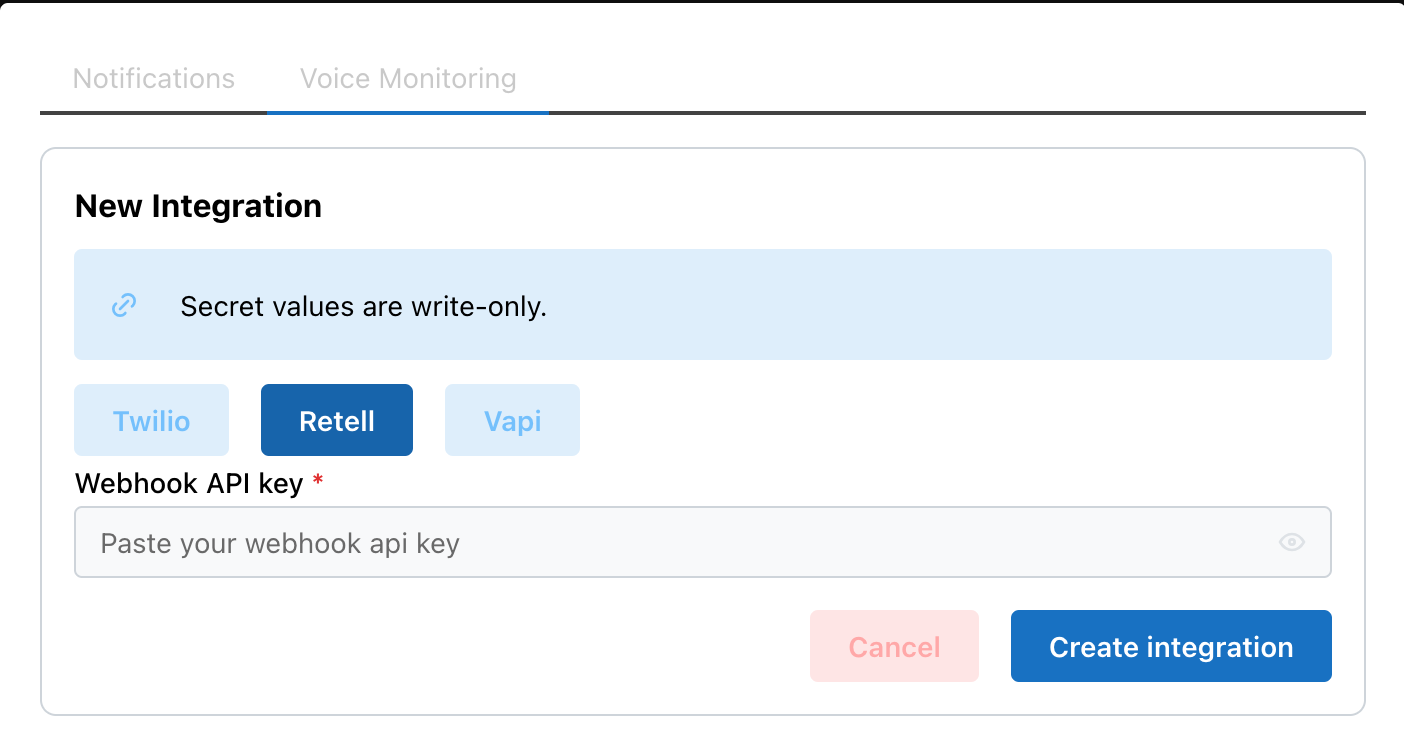
- In Okareo -> User & Org Settings -> Integrations -> Voice Monitoring, click on "New Twilio Integration" or "+ New Integration"
- Choose "Twilio", add the auth token, and click "Create Integration"
- The
client.calls.create(...)request below places a call and configures Twilio to send the completed recording webhook to Okareo:
from twilio.rest import Client

ACCOUNT_SID = "<YOUR_TWILIO_ACCOUNT_SID>"
AUTH_TOKEN = "<YOUR_TWILIO_AUTH_TOKEN>"

client = Client(ACCOUNT_SID, AUTH_TOKEN)
client.calls.create(
    to="<TO_PHONE_NUMBER>",
    from="<FROM_PHONE_NUMBER>",
    ...
    record=True,
    recording_channels="dual",
    recording_status_callback="https://api.okareo.com/v0/voice/twilio/monitor/<PUBLIC_ID>?first_turn=assistant",
    recording_status_callback_event=["completed"]
)
Since the Twilio recording callback does not provide a diarized transcript, Okareo will analyze the recording and create one for you.
To ensure the correct role is assigned to each turn, you can set the first_turn query param to either assistant (default) or user.
Retell
Retell monitoring uses Retell's webhook signing model with timestamp-aware verification. Authentication is verified using the Retell signature headers and request body with a stored integration secret.
The recommended way to set up your webhook is described below:
- Get your Retell API key with "Webhook" permissions (per Retell's Secure the Webhook docs)
- In Okareo -> User & Org Settings -> Integrations -> Voice Monitoring, click on "New Retell Integration" or "+ New Integration"
- Choose "Retell", add the API key, and click "Create Integration"
- In Retell, you can configure the webhook at the account or agent level. The
requests.patch(...)call below updates an existing agent so future calls sendcall_analyzedevents to Okareo:
import requests

requests.patch(
    "https://api.retellai.com/update-agent/<AGENT_ID>",
    headers={"Authorization": "Bearer <RETELL_API_KEY>", "Content-Type": "application/json"},
    json={
        "webhook_url": "https://api.okareo.com/v0/voice/retell/monitor/<PUBLIC_ID>",
        "webhook_events": ["call_analyzed"],
    },
)
Calls to this agent will now send recordings to Okareo for analysis.
Vapi
Vapi monitoring is based on a provider-native credential store. Vapi allows you to create a Custom Credential that assigns your Okareo API key to the proper header.
The recommended way to set up your webhook is described below:
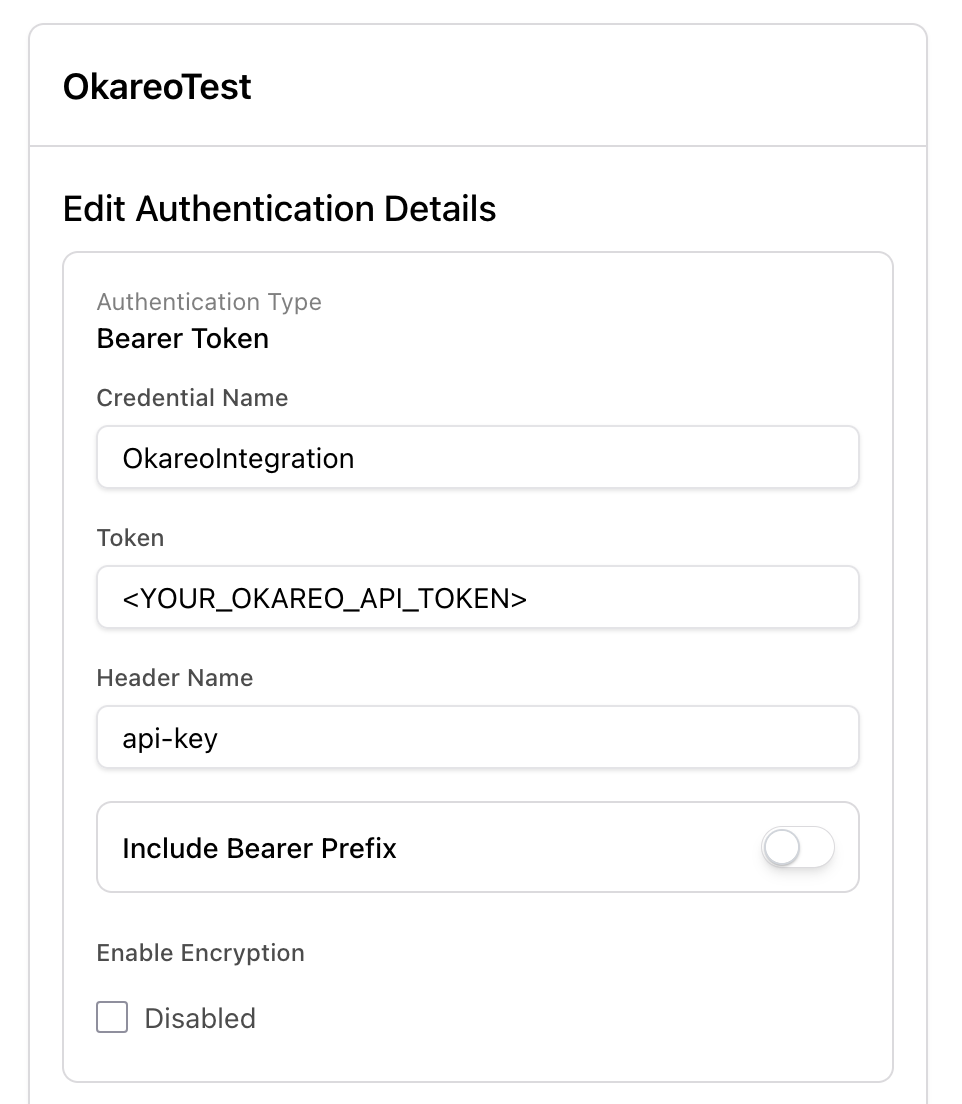
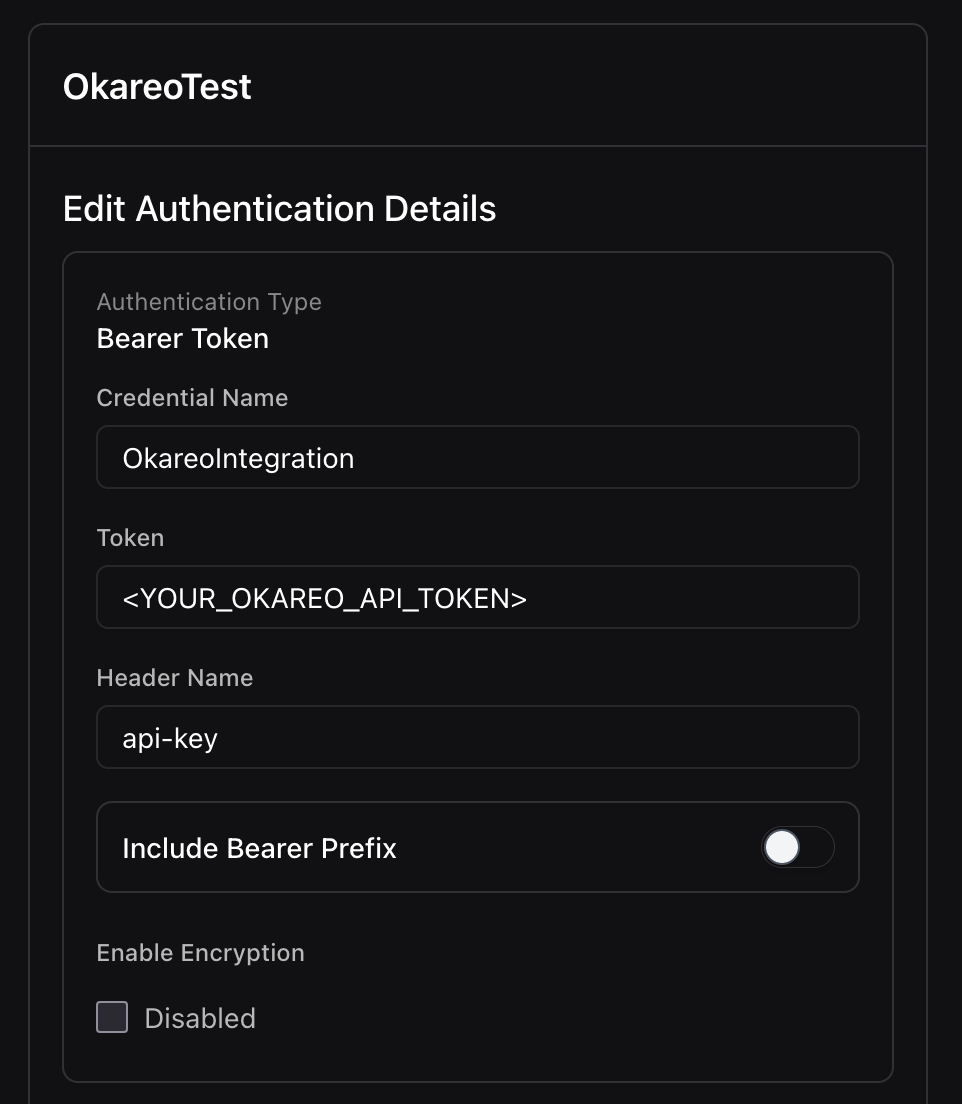
- Follow the instructions for Bearer Token Authentication to create a Custom Credential
- Add your Okareo API key as the "Token", switch the "Header Name" to "api-key", and leave "Include Bearer Prefix" off. See the screenshot below for reference.
- Note the ID for your custom bearer token credential
- The
requests.patch(...)call below updates an existing Vapi assistant so future calls sendend-of-call-reportserver messages to Okareo using your credential. For example:
import requests

requests.patch(
    "https://api.vapi.ai/assistant/<ASSISTANT_ID>",
    headers={"Authorization": "Bearer <VAPI_API_KEY>", "Content-Type": "application/json"},
    json={
        "server": {
            "url": "https://api.okareo.com/v0/voice/vapi/monitor",
            "credentialId": "<CUSTOM_CREDENTIAL_ID>",
        },
        "serverMessages": ["end-of-call-report"],
    },
)
Calls to this Vapi agent will now send recordings to Okareo for analysis.
Custom (via Okareo SDK)
If your call provider is not listed above, you can use the Okareo Python SDK to ingest audio data for analysis.
Use ingest_conversations(...) when you already have a completed call and want Okareo to store it as a monitoring datapoint.
The okareo.ingest_conversations(...) call below sends one completed conversation directly to Okareo for asynchronous processing. It does not configure provider webhooks.
- Include a
call_idfor correlation. - Provide either a pre-parsed
transcript, anaudioreference, or both. - Add
tagsandmetadataif you want monitors or downstream workflows to filter these calls later.
import base64

from okareo import Okareo


okareo = Okareo(api_key="<OKAREO_API_KEY>")

with open("./call.mp3", "rb") as f:
    audio_b64 = base64.b64encode(f.read()).decode("utf-8")

response = okareo.ingest_conversations(
    project_id="<PROJECT_ID>",
    conversations=[
        {
            "source_platform": "custom",
            "call_id": "call-123",
            "audio": {
                "type": "inline_b64",
                "inline_b64": audio_b64,
            },
            "transcript": [
                {
                    "role": "user",
                    "content": "Hi, I need to update my billing address.",
                    "timestamp_ms": 0,
                },
                {
                    "role": "assistant",
                    "content": "I can help with that. What is the new address?",
                    "timestamp_ms": 1200,
                },
            ],
            "tags": ["support", "billing", "custom-provider"],
            "metadata": {
                "customer_id": "cust_123",
                "provider_name": "my-dialer",
            },
        }
    ],
)

print(response)
Okareo returns an accepted response immediately and processes the conversation asynchronously. After processing completes, you can find the resulting datapoint by searching for the call_id as the context_token.
If you do not already have a transcript, omit the transcript field and send only audio. Set diarization=True to have Okareo transcribe the recording and separate turns by speaker.